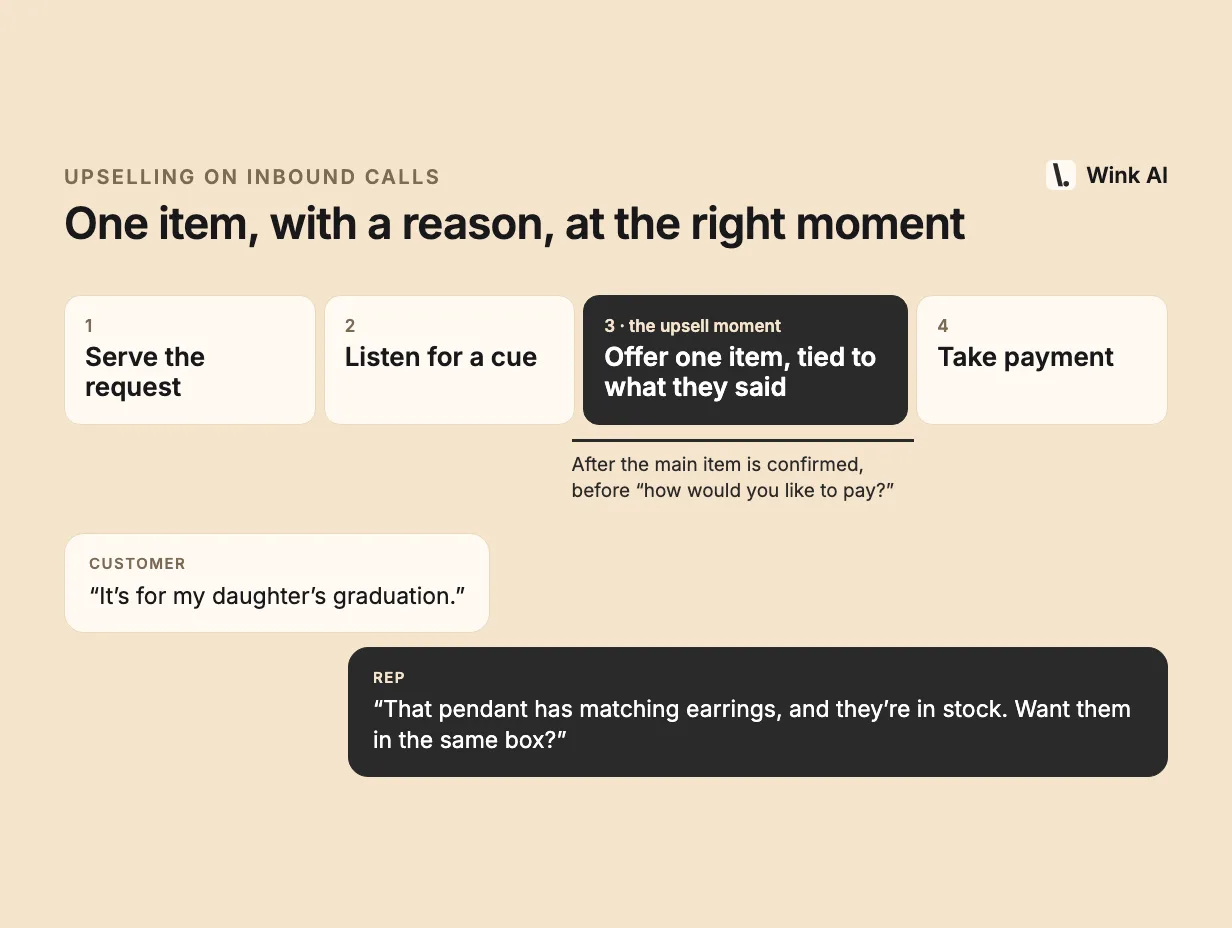
To upsell on inbound calls, finish what the customer called for, then offer one relevant item tied to something they said. Here is the full playbook.
Inbound calls are the easiest sales calls you will ever get. The customer chose to call. They have their wallet nearby, they trust you enough to dial, and they are already in a buying frame of mind. Yet most inbound calls end the moment the original request is done. The rep confirms the order, reads back the total and says goodbye.
That's a missed opportunity, but the fix is not to push harder. Pushy upselling annoys customers, hurts satisfaction scores and makes reps uncomfortable. Good phone upselling feels like service, because it is. This guide covers how to do it well, what to say, and how to coach and measure it.
Serve the original request first
The single biggest mistake in phone upselling is offering something before the customer's own need is met. If someone called to order a pendant they saw on your site, and you start pitching earrings before you've confirmed the pendant is in stock, you've made them wait for the thing they wanted.
Get the original item sorted. Confirm it's available, in the right size or variant, at the right price. Answer their questions. Once the customer feels taken care of, they are open to hearing more. Before that point, any suggestion sounds like a distraction.
Listen for cues
The best upsell is one the customer half-asked for. Customers drop hints all the time, and reps who listen for them close more add-ons with less effort.
- Occasion. "It's for my daughter's graduation." Gifts invite gift-ready additions: a matching piece, a gift box, a second item for another person.
- Usage. "I wear it every day." Daily use suggests durability upgrades, care products or a backup.
- Gaps. "I have the necklace but never found earrings to go with it." That's an open invitation.
- Hesitation about fit. "I'm not sure about the size." A different size, an adjustable option or an easy exchange policy can close the main sale and set up a second one.
- Collecting. "I bought the ring last month." Repeat buyers in a collection often want the next piece.
Train reps to notice these moments and remember them. A cue heard in the first minute can drive the suggestion in the last minute.
Use complete-the-set and complementary items
The most natural upsells complete something. A matching item from the same collection. The accessory that makes the main purchase work. The consumable that goes with the durable.
In jewelry, that's earrings to match a pendant, or a chain for a pendant that comes without one. In auto parts, it's the gasket and bolts that go with a water pump. In wine, it's a second bottle from the same producer, or a different wine for the main course. In AV gear, it's the right cable or a wall mount for the TV.
Complementary items are easier to accept than upgrades because they don't question the customer's original choice. "Great pick, and here's what goes with it" respects the decision. "Have you considered the more expensive one?" can sound like you think they chose wrong.
Use purchase history
If your system shows what the customer has bought before, use it. Past purchases are the strongest signal you have.
A customer who bought an emerald ring two weeks ago and is now calling about something else might love matching emerald earrings. A customer who bought a printer last year probably needs ink. A wine club member who always orders reds might want to hear about a new red from a producer they liked.
Mentioning history also builds trust. "I see you got the emerald ring from us recently" tells the customer you know them, which makes the suggestion feel personal rather than scripted. Just be careful not to suggest things they already own, unless it's something they run out of.
Timing: after the need, before the close
There's a window for the upsell. It opens once the customer's original need is met and closes when you start taking payment.
Too early, and you interrupt the purchase they called about. Too late, during or after payment, and you're asking them to reopen their wallet. The sweet spot is right after the main item is confirmed and before you say "and how would you like to pay?"
Some reps also find a second window: while waiting on something, like a system lookup or a payment authorization. A short, relaxed mention fills dead air and doesn't feel like a pitch.
One suggestion, not three
Offer one thing. Not a list.
Three options turn a quick yes-or-no into a decision the customer has to think about, and thinking on the phone is uncomfortable. They'll often say "no thanks" just to end the effort. One well-chosen item, with a reason, is easy to accept.
If they say yes, you can mention a second item later. If they say no, you haven't burned through all your ideas.
Give a reason tied to what they said
A suggestion without a reason sounds like a script. A suggestion with a reason the customer gave you sounds like listening.
Compare "Would you like to add the matching earrings?" with "You mentioned it's for your daughter's graduation. We have the matching earrings, which would make it a set." The second one connects to the customer's own words. They feel heard, and the item makes sense.
Keep the reason short. One sentence. Then stop talking and let them answer.
Price anchoring, used sensibly
Price matters, and it's fine to mention it. A few practical rules:
- Suggest items in a similar price range to what they're buying or have bought before. If they're spending $40, a $400 add-on won't land.
- Small add-ons relative to the main purchase are easier to accept. A $25 accessory on a $200 order feels minor.
- If there's a real bundle saving or a promotion, say so plainly. Don't invent urgency.
- If the customer states a budget, respect it. Going over a stated budget breaks trust fast.
Handling "no" gracefully
Most upsell offers will get a no. That's normal, and how the rep handles it decides whether the customer enjoys the call.
Accept it immediately and warmly. "No problem at all" and move on. Don't repeat the offer, don't offer a cheaper version right away, and don't make the customer justify their answer. A rep who handles no well will get more yeses over time, because customers don't feel cornered.
The exception is when the no is about something you can fix. "I'd love them, but I'm not sure about the size" is not a no. It's a question.
Sample phrasing
Short, plain lines work best on the phone. A few examples you can adapt:
- "That pendant is part of a collection, and the matching earrings are in stock. Want me to add them?"
- "Since you got the sapphire ring from us last month, you might like this bracelet. Same stone, same style."
- "That water pump usually goes in with a new gasket. Want me to add one so you have it ready?"
- "If you're serving it with the lamb, this red from the same producer is a really good match."
- "That TV is heavy. Do you have a wall mount for it, or should I add one?"
- "You said it's a gift. I can add a gift box for $5 if that helps."
Notice what they share: one item, one reason, a yes-or-no question, and a stopping point.
How to coach it
Upselling is a skill, and it improves fastest with specific feedback on real calls.
- Review real calls. Listen to calls where the rep upsold successfully and calls where they missed a clear cue. Point to the exact moment the opportunity appeared.
- Share winning lines. Collect phrasing from your top performers and let the team borrow it. Reps learn from each other faster than from a script.
- Role-play the no. Many reps avoid upselling because they dislike hearing no. Practicing a graceful exit removes that fear.
- Teach the catalog in layers. Reps can't memorize thousands of products. Teach the best-selling pairings first, then build out.
- Score calls consistently. If your QA rubric includes upsell behavior, apply it to a broad sample of calls, not just a handful. Automated call scoring makes this practical at volume.
How to measure it
Pick a few metrics and track them weekly.
- Attach rate. The share of orders with more than one item, or with an item beyond what the customer called for.
- Upsell revenue per call. Additional revenue divided by calls handled. This rewards both frequency and size.
- Offer rate. How often reps make an offer at all. Low offer rates usually mean reps are hesitant, not that customers are unwilling.
- Acceptance rate. The share of offers that convert. Very high acceptance with a low offer rate means reps are only offering when it's obvious, and could offer more.
A caution on attribution. It's hard to know whether a customer bought the second item because of the offer or would have bought it anyway. Compare against a baseline, such as the same reps before a change or a similar team without it, and look at trends over weeks rather than days. Be skeptical of any tool or report that credits every add-on to the last suggestion shown.
How real-time AI helps
The hardest part of upselling at scale is the catalog. A rep might know a few hundred products well. Your catalog might have tens of thousands, changing daily, with sizes and stock that move during the call. No rep can hold all of that in their head while also listening carefully to a customer.
That's where real-time agent assist helps. Software that listens to the call can notice the cue, match it against the customer's purchase history and your live catalog, and put one relevant, in-stock suggestion in front of the rep at the right moment. The rep still decides whether to offer it and how to phrase it. The AI just removes the searching.
Wink AI does this for phone sales teams. It listens to both sides of the call, suggests complementary items based on what the customer is saying and what they've bought before, checks stock and size, and lets reps type questions mid-call. Personal shoppers at ShopLC use it to make relevant suggestions without manually searching the catalog; you can read their story or see how Wink works.