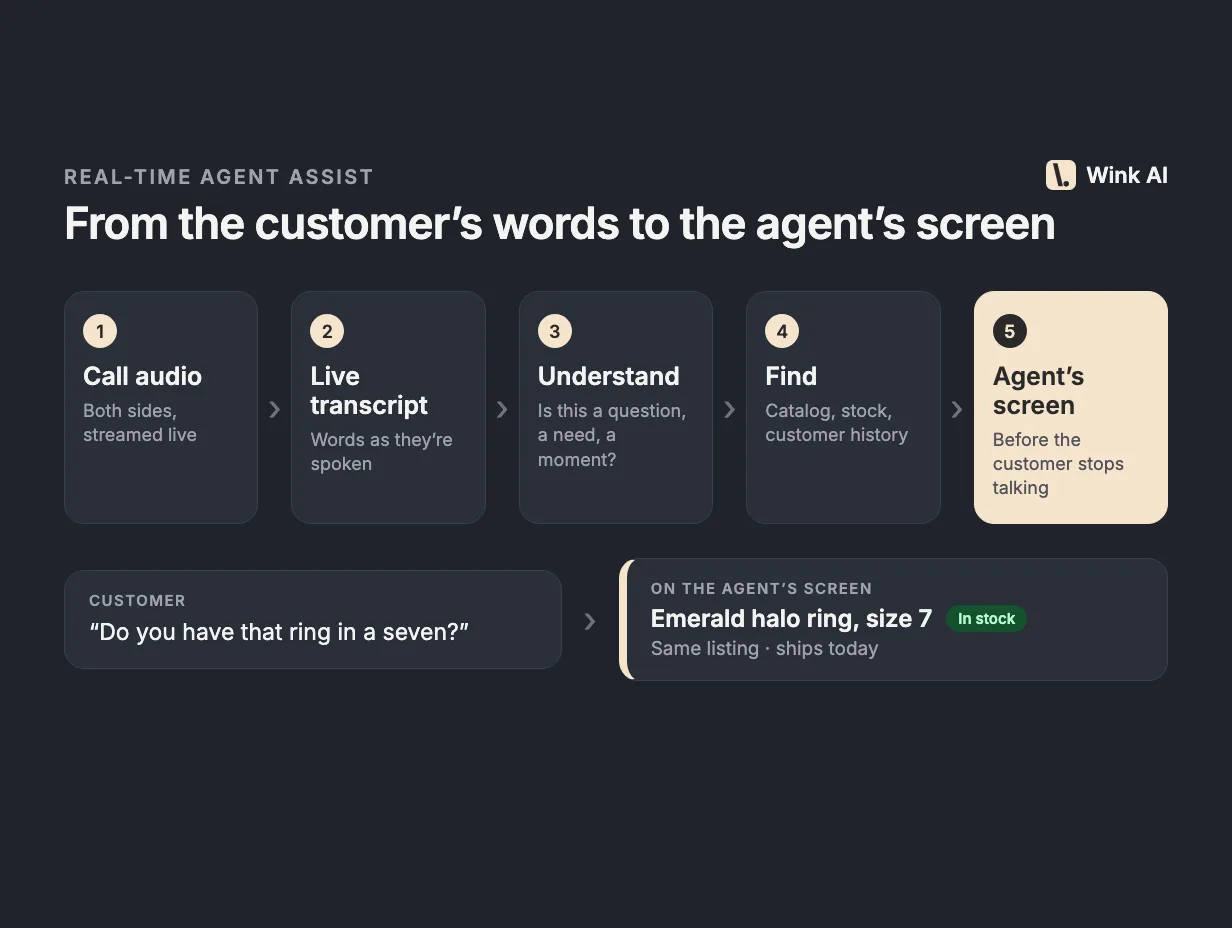
Real-time agent assist is software that listens to a live customer call and gives the agent help on screen while the call is still happening.
It transcribes both sides of the conversation as people speak, works out what the customer needs, and surfaces the answer, product, prompt or next step the agent should use. The agent stays in charge of the conversation. The software does the looking up, the remembering and the noticing, so the agent can keep listening.
That last point is the whole idea. A good agent on a busy line is doing three jobs at once: listening, typing and searching. Real-time agent assist, sometimes called agent assist AI or live call guidance, takes the searching and remembering off their plate.
How real-time agent assist works
Every product in this category, whatever it calls itself, runs some version of the same five-step pipeline. The steps matter because each one adds delay, and delay is what decides whether the help arrives in time.
- Audio capture. The system needs both the agent's microphone and the customer's side of the line, ideally as separate channels. It gets them from the dialer or contact-center platform, from a browser extension, or from a small desktop app that captures the softphone's audio.
- Streaming speech recognition. Audio is transcribed continuously, not after the call. Good systems produce partial transcripts while a sentence is still being spoken, then a final version once the speaker pauses.
- Understanding. Something has to decide what the latest turn means. Is the customer asking for a product, giving their address, complaining about a late order, or just saying hello? This is where classifiers and language models come in.
- Retrieval and decision. Once the system knows what is being asked, it looks up the answer: a product in the catalog, an article in the knowledge base, an order in the CRM, a required disclosure. Then it decides whether the result is good enough to show.
- In-call display. The result appears in a panel next to the agent's dialer or CRM, short enough to read at a glance. The agent can use it, ignore it, or ask a follow-up.
Steps 2 through 5 have to finish while the moment is still live. If a customer asks whether a ring comes in a size seven, the answer is useful in the next few seconds. Twenty seconds later the agent has already said "let me check" and put the customer on hold.
What teams use it for
The same pipeline serves very different goals depending on what it retrieves and when it speaks up.
- Sales and upselling. Suggesting a complementary item, a matching piece, or a better-fit product based on what the customer said and what they bought before. See our guide on how to upsell on inbound calls for the human side of this.
- Product and catalog questions. Answering "do you have this in blue" or "what's the warranty on that model" from live catalog and stock data, so agents stop putting customers on hold to search.
- Knowledge lookup for service. Pulling the right policy, troubleshooting step or return rule when a customer describes a problem.
- Compliance prompts. Reminding the agent to read a required disclosure, confirm consent, or avoid a phrase that regulators care about.
- Customer context. Showing the caller's recent orders, open issues and preferences at the start of the call, so nobody has to ask "can you give me your order number again".
- Note-taking. Capturing the transcript and key details so the agent isn't typing while listening.
Most teams start with one of these and add others. Sales teams usually care most about product suggestions. Service teams usually start with knowledge lookup.
How it differs from conversation intelligence and voice bots
Three kinds of software get lumped together under "AI for calls". They solve different problems.
Post-call conversation intelligence
Conversation intelligence tools record and transcribe calls, then analyze them after the fact. They score calls, find trends, flag coaching moments and feed QA programs. This is valuable, and many agent assist products include it too. But it helps the next call, not this one. A manager learns on Thursday that an agent missed an upsell on Tuesday.
Real-time agent assist acts during the call. The two are complementary: what you learn from post-call analysis tells you what the live assistant should be prompting for.
AI voice bots
Voice bots and AI phone agents replace the human on the call, usually for simple, repeatable tasks like order status or appointment booking. They can handle volume, but customers notice, and for high-value, high-trust conversations most businesses still want a person.
Agent assist keeps the person. The customer talks to a human. The AI is invisible to them and works for the agent. For sales calls in particular, where rapport and judgment drive the result, that tends to be the better trade.
What to look for when buying
Demos are easy to make look good. A scripted call with a clear question and a clean microphone will impress anyone. These are the questions that separate tools that work on real calls from tools that work in demos.
Latency on real calls
Ask how long it takes from the customer finishing a sentence to a suggestion appearing on screen, measured on production traffic, not a demo. Ask what happens on a slow turn. A system that is usually fast but sometimes takes fifteen seconds will lose agents' trust, because they can't rely on it when it matters. For a look at the engineering tradeoffs, see how we made real-time upsells fast.
Accuracy on phone audio and accents
Phone audio is compressed and noisy, and callers come from everywhere. A speech engine that is excellent on podcast audio can fall apart on an older caller with a regional accent over a cell connection. Ask for results on your own recorded calls, and check the words that matter to your business: product names, model numbers, sizes, brand names. If your callers speak more than one language, test those too.
Grounding in your catalog and CRM
A suggestion is only useful if it's real. The assistant should pull from your live catalog with current stock, price and variants, and from your customer records. A general-purpose model that "knows about jewelry" or "knows about car parts" will cheerfully suggest things you don't sell. Ask whether suggestions can recommend out-of-stock items, and how quickly catalog changes show up.
Works with your phone system
Find out exactly how audio gets in. Does it integrate with your contact-center platform natively? Does it need a browser extension, a desktop app, or a change to your telephony setup? How does it handle agents on different softphones? An assistant that needs a six-month telephony project will not get adopted.
Agent trust and false alarms
The most common way agent assist fails is noise. If the panel fires a suggestion on every greeting, every address readback and every "how are you today", agents learn to ignore it within a week. Ask how the system decides when to stay quiet. Ask what share of suggestions agents actually use. A tool that shows fewer, better suggestions beats one that shows more.
Security and privacy
Live call audio contains personal data and sometimes payment details. Ask whether the system stops listening when your call recording is paused, whether card numbers are redacted from transcripts, where data is stored and processed, which subprocessors are involved, and whether agents sign in through your single sign-on. Get these answers in writing before a pilot.
Measurable outcomes
Agree up front on what success looks like: attach rate, revenue per call, handle time, hold time, QA scores. Ask how the vendor attributes outcomes to suggestions, and be skeptical of numbers that credit the tool with every sale that followed a suggestion.
A practical way to evaluate
Run a short pilot with a handful of agents, including at least one skeptic and one top performer. Compare their calls with and without the tool on the same queues. Read transcripts of calls where the assistant fired and ask: was the suggestion right, was it on time, and did the agent use it? Ask the agents what they ignored and why. Their answers will tell you more than any dashboard.
Where Wink fits
Wink AI is a real-time agent assist product built for sales calls. It listens to both sides of the call, transcribes in 30 languages, and suggests products from your live catalog based on what the customer is saying and what they've bought before, while the customer is still on the line. Agents can also type questions mid-call, like "matching necklace under $150?", and get products they can sell. After the call, Wink writes a summary and can score the call against your QA rubric.
It runs in the browser next to the dialer, with a Windows companion app for capturing call audio. Personal shoppers at ShopLC use it on their sales calls; you can read how ShopLC uses Wink, or see how Wink works.